
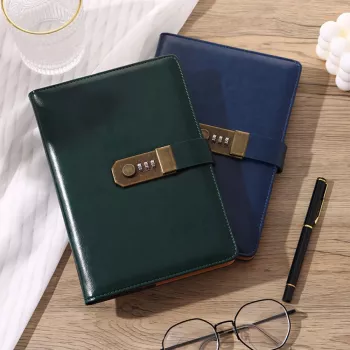
A locked password notebook keeps account details in one place without relying on a device, apps, or cloud syncing. For households, shared accounts, and anyone who prefers paper organization, an A5 format with a built-in lock offers a helpful balance of convenience, portability, and an added physical barrier against casual access. It’s not a replacement for modern security—strong passwords and multi-factor authentication still matter—but it can reduce day-to-day friction and the “where did we write that down?” problem.
A notebook lock is best viewed as privacy + deterrence, not a “vault.” It can help keep credentials from being casually seen, especially in shared spaces.
For guidance on strong authentication practices, see the FTC’s recommendations on creating and protecting strong passwords, CISA’s overview of multi-factor authentication, and the NIST Digital Identity Guidelines for authentication and lifecycle management.
A5 is a sweet spot for password notebooks: small enough to carry, but large enough to write clearly—especially when a password is long, randomly generated, or includes symbols that are easy to mix up. A structured layout also helps reduce mistakes when copying credentials (for example, confusing O/0 or l/1) and makes updates less annoying.
Helpful fields to look for on each page include:
To keep things scannable, use consistent naming such as “Bank – Main Login” and “Bank – Credit Card Portal.” Also plan for change: passwords rotate, emails change, and some services use multiple usernames—leaving room for updates prevents messy cross-outs that can cause errors later.
Every method has tradeoffs. Paper can be more resilient against hacking, but it’s vulnerable to loss, fire, and physical theft. Password managers are efficient and can generate unique passwords, but require device access and a solid recovery plan. Browser-saved passwords are convenient, yet riskier on shared or compromised devices. A locked notebook can serve as a primary system for low-to-moderate risk accounts, or as a backup record for critical ones.
| Method | Best for | Main risk | Good add-on habit |
|---|---|---|---|
| Locked password notebook | Offline organization and quick reference | Physical loss or theft | Store in a consistent secure place; avoid labeling it obviously |
| Password manager app | Many accounts and strong unique passwords | Account recovery issues; device compromise | Enable multi-factor authentication; keep recovery codes safe |
| Browser autofill | Convenience on a single personal device | Exposure on shared or infected devices | Use device lock + separate user profile; review saved logins regularly |
| Plain notes (unlocked) | Temporary reminders only | Easy casual access | Move to a locked notebook or manager promptly |
A lock helps deter casual access, but it’s not a substitute for strong, unique passwords and multi-factor authentication on critical accounts. For higher-stakes logins, store the notebook in a more secure location (like a locked drawer) or use it as a backup reference rather than the only place your credentials exist.
It’s safer to keep recovery codes protected and ideally separated from the main password list, so one loss doesn’t expose everything. If you do record them, treat the notebook like a higher-security item and avoid combining all recovery details in one easily accessible place.
Record the site/app name, username, login email, MFA method, brief notes (like which device receives prompts), and a “last updated” date. If you must note security questions, keep the info minimal and organized to reduce mistakes during account recovery.





Leave a comment